Complete Step-by-Step Guide
How to Ground an ESD Mat: Complete Step-by-Step Guide
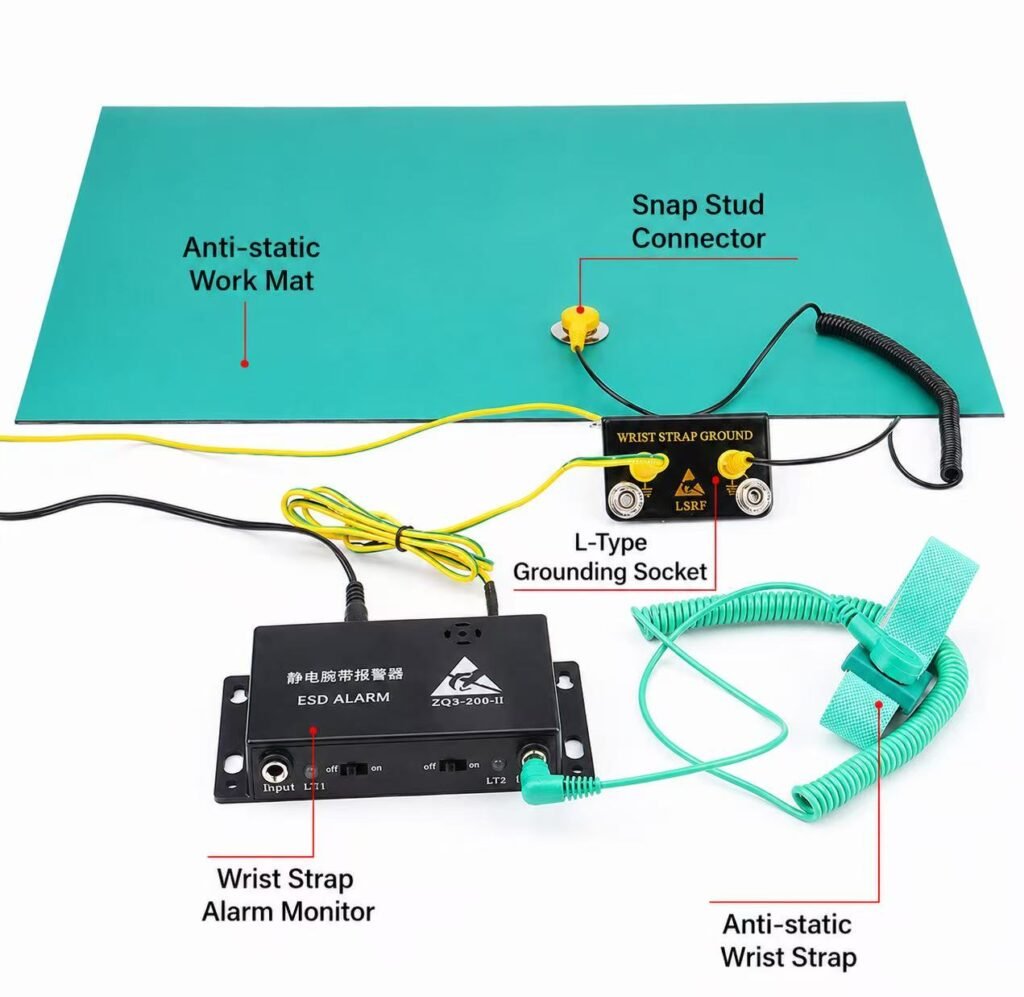
Quick Answer: How Do You Ground an ESD Mat?
To ground an ESD mat correctly, connect the mat to a verified earth ground using an ESD grounding cord and a common point ground. The mat should provide a controlled path for static electricity to dissipate safely, helping protect sensitive electronic components from electrostatic discharge damage.
A proper ESD mat grounding setup usually includes:
| Component | Purpose |
|---|---|
| ESD mat | Provides a static dissipative work surface |
| Grounding cord | Connects the mat to ground |
| Common point ground | Connects the mat, wrist strap, and workstation to the same ground point |
| Earth ground | Safely dissipates static charge |
| Resistance tester | Verifies the grounding system is working |
📞 Contact Us Today
For bulk orders, quotes, or product guidance, get in touch with our expert team:
Email: sales2@esdbest.com
Whatsapp: +86 137 1427 2599
Why Does an ESD Mat Need Grounding?
An ESD mat is designed to control static electricity on a workbench, production line, repair station, or electronics assembly area. However, the mat itself does not make static charge disappear automatically.
Static electricity needs a safe path to ground.
The basic path is:
Operator / Tool / Component
↓
ESD Mat
↓
Grounding Cord
↓
Common Point Ground
↓
Earth Ground
When the ESD mat is properly grounded, static charge can dissipate gradually and safely instead of discharging suddenly into a PCB, IC, sensor, LED, or electronic device.
This is especially important in:
- PCB assembly
- SMT production
- Electronics repair
- Semiconductor handling
- Cleanroom workstations
- Mobile phone repair
- Computer repair
- ESD protected areas
- Electronic component packaging areas
Without grounding, an ESD mat cannot complete the static dissipation path.
What Happens If an ESD Mat Is Not Grounded?
An ungrounded ESD mat may still look professional, but it may not protect your electronics.
| Grounded ESD Mat | Ungrounded ESD Mat |
|---|---|
| Static charge has a discharge path | Static charge may remain on the surface |
| Helps protect PCB and components | May allow ESD risk |
| Supports ESD workstation setup | Incomplete protection system |
| Can be tested and verified | Hard to confirm protection |
| Suitable for electronics work | Risky for sensitive devices |
Need ESD Mats and Grounding Accessories?
ESDBEST provides ESD mats, bench mats, floor mats, grounding cords, common point ground accessories, and static control solutions for electronics manufacturing.
Applications: PCB assembly, SMT production, electronics repair, ESD workstations, and factory static control areas.
Email: sales2@esdbest.com
Request Bulk Quote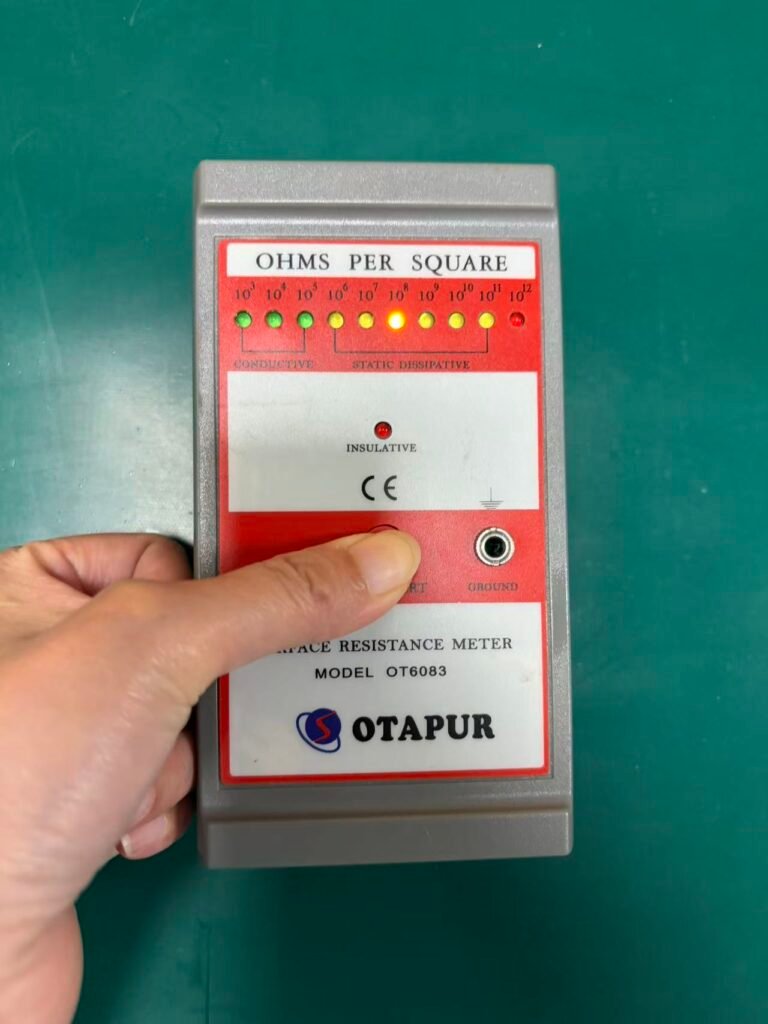


An ESD mat without grounding is not a complete ESD control solution.
It may reduce some static risk, but it cannot be trusted as a proper ESD workstation surface unless it is connected to a verified ground.
How to Ground an ESD Mat Step by Step
Step 1: Place the ESD Mat on the Workbench or Floor
First, place the ESD mat flat on the work surface or floor area.
Make sure the surface is clean, dry, and stable. Avoid placing the mat on dusty, oily, wet, or uneven surfaces because poor contact and contamination may affect ESD performance.
For a ESD bench mat, the mat should cover the main working area where PCBs, tools, and components are handled.
For a ESD floor mat, the mat should be positioned where operators stand or move during electronics production.
Step 2: Install the Snap Connector
Most ESD mats use a metal snap connector.
The snap is usually installed at the corner or edge of the mat so it does not interfere with normal work.
The snap provides the connection point between the ESD mat and the grounding cord.
Common snap sizes include:
| Snap Type | Common Use |
|---|---|
| 10 mm snap | Common for ESD bench mats |
| 4 mm snap | Some wrist strap and grounding systems |
| Universal snap | Used with different grounding accessories |
Make sure the snap is firmly attached to the mat.
A loose snap may cause poor grounding.
Step 3: Connect the ESD Grounding Cord
Attach the ESD grounding cord to the snap connector on the mat.
The grounding cord should usually include a built-in resistor, commonly 1 megohm, to help control discharge speed and improve operator safety.
The grounding cord should not be damaged, cut, loose, or excessively stretched.
A good grounding cord should be:
- Firmly connected
- Clean and undamaged
- Suitable for ESD use
- Long enough to reach the grounding point safely
- Not blocking normal work movement
Avoid using random electrical wires as a replacement for a proper ESD grounding cord.
Step 4: Connect to a Common Point Ground
A common point ground is the recommended connection point for an ESD workstation.
It allows the ESD mat, wrist strap, and other ESD accessories to connect to the same grounding system.
A common point ground helps ensure that all parts of the workstation are at the same electrical potential.
This reduces the risk of sudden discharge between the operator, tools, mat, and electronic components.
A typical setup looks like this:
Wrist Strap
     ↓
Common Point Ground ← ESD Mat Grounding Cord
     ↓
Verified Earth Ground
For professional electronics manufacturing, using a common point ground is better than connecting different ESD items to random ground points.
Learn more: ESD wrist strap guide
Step 5: Connect to Verified Earth Ground
The common point ground should be connected to a verified earth ground.
This may be a properly grounded outlet, grounding terminal, grounding bus, or approved facility ground point.
Do not connect the mat to:
- Painted metal surfaces
- Plastic tables
- Random screws
- Unverified metal frames
- Water pipes without verification
- Power lines
- Unknown ground points
The ground point must be tested and verified.
If you are not sure whether a ground point is safe, ask a qualified electrician or ESD technician to check it.
Step 6: Test the Ground Connection
After installation, test the ESD mat and grounding connection.
Testing is important because a mat may be connected incorrectly even if it looks fine.
You can test:
- Resistance from mat surface to ground
- Continuity of grounding cord
- Common point ground connection
- Wrist strap connection
- Overall workstation grounding
Testing helps confirm that your ESD mat is not just installed, but actually working.
How to Test an ESD Mat Ground Connection
To test an ESD mat ground connection, use an ESD resistance tester or a suitable meter designed for ESD testing.
A simple test method:
- Place one probe on the ESD mat surface.
- Connect the other probe to the ground point.
- Measure the resistance.
- Confirm the result is within your required ESD control range.
- Record the test result if you are managing a production line or ESD protected area.
Typical ESD mat resistance is often in the dissipative range, but the required value depends on the application, material, and ESD control program.
For electronics workstations, many ESD mats are designed to provide controlled resistance rather than direct metal-like conductivity.
This helps prevent fast discharge.
Can You Ground an ESD Mat to a Wall Outlet?
Yes, an ESD mat can be grounded through a properly grounded wall outlet using the correct ESD grounding adapter. However, the outlet ground must be verified before use.
You should never insert wires directly into a power socket.
Use only approved ESD grounding plugs or grounding adapters designed for ESD workstations.
A safe wall outlet grounding setup usually includes:
| Item | Purpose |
|---|---|
| ESD grounding plug | Connects to the outlet ground only |
| Grounding cord | Connects mat to grounding plug |
| Common point ground | Connects mat and wrist strap |
| Outlet tester | Confirms the outlet ground is valid |
Important:
Do not use the live or neutral holes of a power outlet for ESD grounding.
Only the verified earth ground connection should be used.
Can an ESD Mat Work Without Grounding?
An ESD mat should not be used without grounding if you need reliable ESD protection.
Some mats may reduce surface charge compared with normal plastic or rubber materials, but without grounding, static electricity has no complete path to leave the workstation.
For serious electronics work, the ESD mat must be grounded.
Use an ungrounded mat only for very low-risk situations, not for sensitive PCB, IC, or semiconductor handling.
Bench Mat Grounding vs Floor Mat Grounding
ESD bench mats and ESD floor mats both need grounding, but their setup may be different.
| Item | ESD Bench Mat | ESD Floor Mat |
|---|---|---|
| Location | Workbench surface | Floor area |
| Main purpose | Protect PCB and components on table | Control operator movement and standing area |
| Grounding method | Grounding cord and common point ground | Floor mat grounding cord or groundable flooring system |
| Used with | Wrist strap, tools, PCB | ESD shoes, heel grounders, carts |
| Testing | Surface-to-ground resistance | Point-to-point and resistance-to-ground testing |
For a complete ESD protected area, both bench mats and floor mats may be used together.
Common ESD Mat Grounding Mistakes
Mistake 1: Using an ESD Mat Without a Grounding Cord
This is one of the most common mistakes.
The mat may look correct, but the static charge has no proper path to ground.
Mistake 2: Connecting the Mat to Painted Metal
Paint can block electrical contact.
A painted metal table leg is not always a valid ground.
Mistake 3: Using a Random Wire
Random wires may not have the correct resistance, safety design, or connector quality.
Use proper ESD grounding cords.
Mistake 4: Forgetting the Common Point Ground
If the wrist strap, mat, and workstation are connected to different ground points, potential differences may exist.
A common point ground helps avoid this problem.
Mistake 5: Not Testing the Ground
Installation is not enough.
You must test the ground connection regularly.
Mistake 6: Using Damaged Grounding Cords
A broken cord may look connected but fail internally.
Inspect cords regularly.
Mistake 7: Grounding Only the Mat but Not the Operator
The mat protects the work surface, but the operator should also be grounded through a wrist strap or ESD footwear system depending on the workstation setup.
ESD Mat Grounding Requirements for Electronics Manufacturing
In professional electronics manufacturing, ESD mat grounding should be part of a full ESD control program.
A proper ESD workstation may include:
- ESD bench mat
- ESD floor mat
- ESD wrist strap
- Common point ground
- ESD grounding cord
- ESD-safe tools
- ESD packaging
- ESD garments
- Regular resistance testing
- Operator training
The goal is not only to buy ESD products.
The goal is to build a controlled ESD protection system.
A single ESD mat cannot protect the entire process if other parts of the workstation are not controlled.
Best ESD Mat Grounding Setup
For most electronics workbenches, the best setup is:
ESD Bench Mat
     ↓
Mat Grounding Cord
     ↓
Common Point Ground
     ↓
Verified Earth Ground
And the operator should use:
ESD Wrist Strap
     ↓
Common Point Ground
     ↓
Verified Earth Ground
This creates a complete workstation grounding system.
For standing work areas, use:
Operator
     ↓
ESD Shoes / Heel Grounders
     ↓
ESD Floor Mat
     ↓
Ground
This is especially useful in production lines, assembly areas, and repair workshops.
How Often Should You Test an ESD Mat?
ESD mat testing frequency depends on your production environment and ESD control requirements.
A practical schedule:
| Environment | Suggested Testing Frequency |
|---|---|
| Home electronics repair | Monthly or before important work |
| Small repair shop | Weekly |
| Electronics production line | Daily or per shift |
| ESD protected area | According to internal ESD program |
| High-risk semiconductor area | More frequent verification |
Also test after:
- Moving the workstation
- Replacing the mat
- Replacing grounding cords
- Cleaning the mat
- Changing the ground point
- Any ESD audit failure
ESD Mat Grounding Checklist
Before using your ESD mat, check the following:
- The mat is clean and flat.
- The snap connector is secure.
- The grounding cord is connected.
- The grounding cord is not damaged.
- The common point ground is installed.
- The ground point is verified.
- The mat resistance has been tested.
- The wrist strap or footwear system is also controlled.
- Test records are maintained if required.
If any item fails, do not rely on the mat for ESD protection until the issue is fixed.
Choosing the Right ESD Mat and Grounding Accessories
When choosing an ESD mat, do not only look at price.
Check:
| Factor | Why It Matters |
|---|---|
| Surface resistance | Determines static control performance |
| Material | Affects durability, heat resistance, and cleaning |
| Thickness | Affects comfort and lifespan |
| Size | Must fit the workstation |
| Grounding accessories | Needed for proper installation |
| Application | Bench, floor, repair, assembly, cleanroom |
| Test data | Helps verify performance |
A good ESD mat should be used with matching grounding cords, snaps, and common point ground accessories.
Recommended ESD Mat Applications
ESD mats are commonly used in:
- PCB assembly
- SMT production
- Electronics repair
- Mobile phone repair
- Computer repair
- Semiconductor handling
- Testing laboratories
- Electronic component inspection
- Packaging stations
- Cleanroom production
- Industrial workbenches
If your work involves sensitive electronic components, a grounded ESD mat is usually a basic requirement; At the same time,we need to follow ANSI ESD and IEC61340,to ensure sensitive electronic safe.
ESDBEST ESD Mat Solutions
ESDBEST provides ESD mats and static control products for electronics manufacturing, repair, and assembly environments.
Our ESD mat solutions can be used for:
- ESD workbenches
- PCB assembly stations
- Electronics repair desks
- Production lines
- ESD protected areas
- Factory static control systems
Need help choosing the right ESD mat and grounding accessories?
Contact ESDBEST for bulk orders, OEM supply, and ESD workstation solutions.
Email: sales2@esdbest.com
FAQ
What is ESD Mat?
A mat Anti static
Do ESD mats need to be grounded?
Yes. An ESD mat should be grounded to provide a safe path for static electricity to dissipate. Without grounding, the mat may not provide reliable ESD protection for sensitive electronic components.
How do you ground an ESD mat?
Connect the ESD mat to a verified earth ground using a snap connector, ESD grounding cord, and common point ground. After installation, test the resistance from the mat surface to ground.
Can I use an ESD mat without grounding?
You should not rely on an ungrounded ESD mat for serious electronics work. Without grounding, static charge may remain on the mat surface and increase the risk of electrostatic discharge.
Can I ground an ESD mat to a wall outlet?
Yes, but only by using a proper ESD grounding plug or adapter connected to the verified earth ground of the outlet. Never connect wires directly into a power outlet.
What is a common point ground?
A common point ground is a central grounding connection used to connect the ESD mat, wrist strap, and other ESD workstation items to the same ground point.
What resistance should an ESD mat have?
The required resistance depends on the mat type and ESD control program. Many ESD mats are designed to be static dissipative, allowing charge to drain safely instead of discharging too quickly.
How often should an ESD mat be tested?
For production environments, ESD mats should be tested regularly according to your ESD control program. Small repair shops may test weekly, while high-risk production lines may test daily or per shift.
Why is my ESD mat not grounding properly?
Common causes include loose snap connectors, damaged grounding cords, unverified ground points, painted metal connections, dirty mat surfaces, or incorrect installation.
Do I need a ESD wrist strap if I have an ESD mat?
In many electronics workstations, yes. The ESD mat protects the work surface, while the wrist strap grounds the operator. Both are often used together for better ESD protection.
What is the difference between an anti-static mat and an ESD mat?
An anti-static mat may reduce static generation, while an ESD mat is designed to control and dissipate static charge through a grounding system. For sensitive electronics, a grounded ESD mat is preferred.
How to establish a EPA area?
learn more about EPA
Learn more:
Need ESD Mats and Grounding Accessories?
ESDBEST provides ESD mats, bench mats, floor mats, grounding cords, common point ground accessories, and static control solutions for electronics manufacturing.
Applications: PCB assembly, SMT production, electronics repair, ESD workstations, and factory static control areas.
Email: sales2@esdbest.com
Request Bulk QuoteHow to Test an ESD Mat
Grounding an ESD mat is only the first step. Learn how to measure surface resistance, resistance-to-ground, grounding continuity, and overall ESD mat performance using a surface resistance meter.
- Surface resistance testing procedure
- Resistance-to-ground measurement
- Acceptable ESD mat resistance ranges
- Common testing mistakes to avoid